Today we are seeing more and more performant Python libraries gaining traction that are written in Rust.
Astral’s uv and ruff are bringing an immense amount of convenience to Python programming.
Struggling with package management and environment settings is becoming a thing of the past thanks to uv, and code and
documentation quality are considerably enhanced and standardized thanks to ruff.
Another example is polars. It is effectively proving its performance and efficiency in memory usage compared to
pandas, almost to the point that in the near future pandas might be labeled as legacy.
pydantic’s second major version has also demonstrated significant performance improvements compared to the older one.
You may already notice the common trait among all the libraries mentioned above: their implementation is in Rust.
How Rust can bring such enhancements in performance and efficiency deserves a whole semester-long study. This post, rather than delving into the internals of refactoring Python libraries into Rust and the benefits of doing so, will introduce how such a handshake is possible.
Application Binary Interface
Application Binary Interface, shortened as ABI, is a low-level interface that defines how compiled programs interact with each other. The concept of ABI is often compared to that of an API. An API provides a high-level communication contract between applications (such as web servers in the form of RESTful APIs).
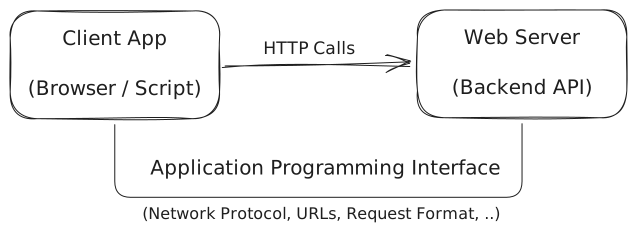
An ABI defines how programs interact at the binary level — including calling conventions, data types, memory layout, and how functions are linked.
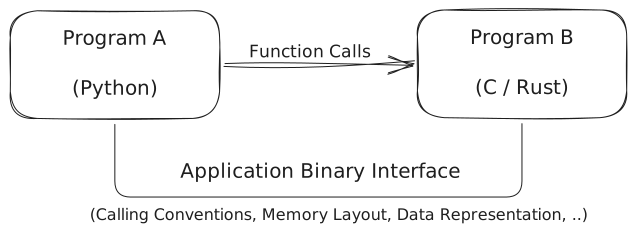
Python makes use of this idea by exposing a C API. The C API provides a set of functions and data structures that allow
external programs to interact with the Python runtime. By compiling code that follows the same ABI as the Python
interpreter, other languages can produce extension modules as shared libraries (such as .so files on Linux) that
Python can dynamically load and execute.
PyO3 and Maturin
PyO3 is a Rust library that provides bindings to Python’s C API, allowing Rust code to interact directly with the
Python runtime. In this context, a binding is a layer that maps functions and data structures from one language so
they can be used naturally in another.
Using PyO3, Rust functions and data structures can be exposed as Python modules and imported like ordinary Python
packages. The compiled Rust code is built as a shared library (such as a .so file) that Python can load dynamically.
maturin complements PyO3 by providing tooling to build and package these Rust-based Python extensions. It compiles
the Rust code, produces the Python-compatible shared library, and helps distribute it as a standard Python package.
It can also scaffold a new project with the necessary Rust and Python configuration to get started quickly.
A typical project configuration file for a Cargo project with maturin looks like the following:
[package]
name = "greet-runtime"
version = "0.1.0"
edition = "2024"

# See more keys and their definitions at https://doc.rust-lang.org/cargo/reference/manifest.html
[lib]
name = "_greet_runtime"
crate-type = ["cdylib"]

[dependencies]
pyo3 = "0.27.0"
The package section defines basic metadata for the Rust project, such as the crate name, version, and Rust edition
used for compilation.
The lib section configures how the library should be built. Setting crate-type = ["cdylib"] tells Cargo to produce
a C-compatible dynamic library, which is required for Python to load the compiled module as a shared library.
My simple hello-world (literally) maturin project starts from here. The goal is to expose a Python class Message
that receives a string argument text, a greeting message, and speaks it out when the greet method is called.
Normally, the Rust crate implementing the Python extension and the build setup live in the same project. In this
example, however, I separated them: the core Rust logic lives in crates/greet, while a maturin runtime project
depends on that crate and compiles it into a Python extension module. This structure was inspired by the scalable
layout used in the polars project.
The Implementation
The Python-facing API is implemented using PyO3 macros that expose Rust types and methods to Python.
The #[pyclass] macro marks a Rust struct as a Python class, while #[pymethods] defines the methods that will be
available from Python.
#[pyclass]
pub struct PyMessage {
    #[pyo3(get)]
    pub inner_text: String,
}

#[pymethods]
impl PyMessage {
    #[new]
    pub fn new(text: String) -> Self {
        Self { inner_text: text }
    }

    #[staticmethod]
    pub fn greet(name: &str) -> String {
        format!("Hello, {} !", name)
    }
}
Here, PyMessage becomes a Python class whose constructor (#[new]) initializes the struct, while the greet
function is exposed as a static method callable from Python.
Now that the class is defined, we can bind it to a Python module as shown below:
use pyo3::prelude::*;
use crate::message::PyMessage;

#[pymodule]
pub fn _greet_runtime(m: &Bound<'_, PyModule>) -> PyResult<()> {
    m.add_class::<PyMessage>()?;
    Ok(())
}
The #[pymodule] macro defines the Python module entry point. When the compiled extension is loaded, this function
registers the PyMessage class so that it can be imported and used from Python.
In order to expose the build artifact produced by maturin develop, we place a small __init__.py file next to the
compiled extension module:
from ._greet_runtime import *

__doc__ = _greet_runtime.__doc__
if hasattr(_greet_runtime, "__all__"):
    __all__ = _greet_runtime.__all__
The first line imports the compiled extension module (_greet_runtime.cpython-314-darwin.so)
and re-exports the symbols defined in it. This allows Python code to access the Rust-implemented classes and functions
through the package namespace.
The Usage
Once the extension is built with maturin develop, the compiled module can be imported from Python and used to build a
Python-friendly interface.
from _greet_runtime._greet_runtime import PyMessage


def create_pymessage(text: str) -> PyMessage:
    return PyMessage(text)
This small helper simply constructs the Rust-backed object. On top of this, we define a thin Python wrapper class that exposes a more idiomatic interface while delegating the actual logic to the Rust implementation.
from __future__ import annotations
from typing import TYPE_CHECKING

from _greet_runtime._greet_runtime import PyMessage


class Message:
    _msg: PyMessage

    def __init__(self, text: str) -> None:
        from greet._utils.construction.message import create_pymessage
        self._msg = create_pymessage(text)

    def __repr__(self) -> str:
        return f"Message(inner={self._msg.inner_text})"

    @property
    def text(self) -> str:
        return self._msg.inner_text

    @staticmethod
    def greet(name: str) -> str:
        return PyMessage.greet(name)

    def fail_if_empty(self, text: str) -> str:
        return self._msg.fail_if_empty(text)
Here, the Message class acts as a lightweight Python wrapper around the Rust implementation. The underlying logic
lives in the Rust struct PyMessage, while the Python class provides a more ergonomic API for users of the package.
Tests are essential
Since the implementation lives in Rust while the public API is exposed to Python, testing at the Python level is particularly important. It verifies that the extension behaves correctly from the user’s perspective, including object construction, method calls, and error propagation across the Rust–Python boundary.
Since our greeting implementation is very simple, we only need three test cases:
from greet.api import Message


def test_static_greet():
    result = Message.greet("eunsang")

    assert result == "Hello, eunsang !"
    assert isinstance(result, str)


def test_message_instantiation():
    msg_content = "Deep dive into Polars"
    m = Message(msg_content)

    assert msg_content in repr(m)
    assert m._msg.inner_text == msg_content


def test_empty_string():
    result = Message.greet("")
    assert result == "Hello,  !"
Running the tests shows that the Python interface correctly interacts with the underlying Rust implementation:
greet_in_rust % uv run pytest
=============================================================== test session starts ================================================================
platform darwin -- Python 3.14.3, pytest-9.0.2, pluggy-1.6.0
rootdir: /greet_in_rust
collected 3 items

py-greet/tests/test_message.py ...                                                                                                           [100%]

================================================================ 3 passed in 0.04s =================================================================
Conclusion
In this post, we briefly explored how Rust and Python can interoperate through PyO3 and maturin, building a simple
Python extension backed by Rust. The full source code used in this post can be found at:
https://github.com/CynicDog/python-clean-code-club/tree/main/maturin-in-action/greet_in_rust